

Quickstart
Icelake is a fully managed, sovereign European data research workbench on an ultra-fast ClickHouse engine. This guide takes you from zero to answers in two stages — no servers on your side to run, nothing to install:
- In 60 seconds: load a ready-made sample dataset into a Sheet and ask it questions in plain language.
- In 5 minutes: stream live data from your own systems over the standard Prometheus, Loki, and OpenTelemetry endpoints and explore it in Grafana.
1. Get your Icelake account
Section titled “1. Get your Icelake account”Sign up at app.icelake.eu or contact us if your team needs a pilot environment. Accounts are tenant-scoped and include everything — ingest endpoints, admin UI, pgwire SQL, AI MasterMind, dashboards — out of the box.
2. Your first data in 60 seconds — a Sheet
Section titled “2. Your first data in 60 seconds — a Sheet”No API key and no tools needed — everything happens in the browser.
Download a sample (synthetic data — all companies, people and measurements are fictional):
| Sample | Download | What’s inside |
|---|---|---|
| Business intelligence | northpeak-outdoor-sales-2024-2025.zip (2.7 MB) | 122,000 orders of a fictional outdoor-gear brand — regions, channels, products, revenue, margin, returns |
| Science | eu-air-quality-hourly-2025.zip (2.3 MB) | 140,000 hourly readings from 16 European stations — PM2.5, PM10, NO₂, O₃, temperature, wind |
| Medical | ecg-12lead-hl7-obx.zip (2.9 MB) | 240,000 samples of four 12-lead ECGs at 500 Hz, flattened from HL7 v2 — one OBX segment per row |
Then:
- Unzip the file — it contains the CSV and a short README.
- In the admin UI open Insights → Sheets → New Sheet, then click Load Data.
- Drop the CSV. Icelake uploads it straight to storage and detects delimiter, header and column types — review them and click Import. The sheet opens with your data a second later.
- Type a question into Ask your Sheet anything — for example:
- Sales: “Show the monthly revenue per product category for 2025 as a chart. Which category peaks in winter?”
- Air quality: “Which cities exceeded 15 µg/m³ PM2.5 on the most days?”
- ECG: “Plot lead II of patient PAT-0002 for the first 4 seconds. Which finding is recorded for this patient?”
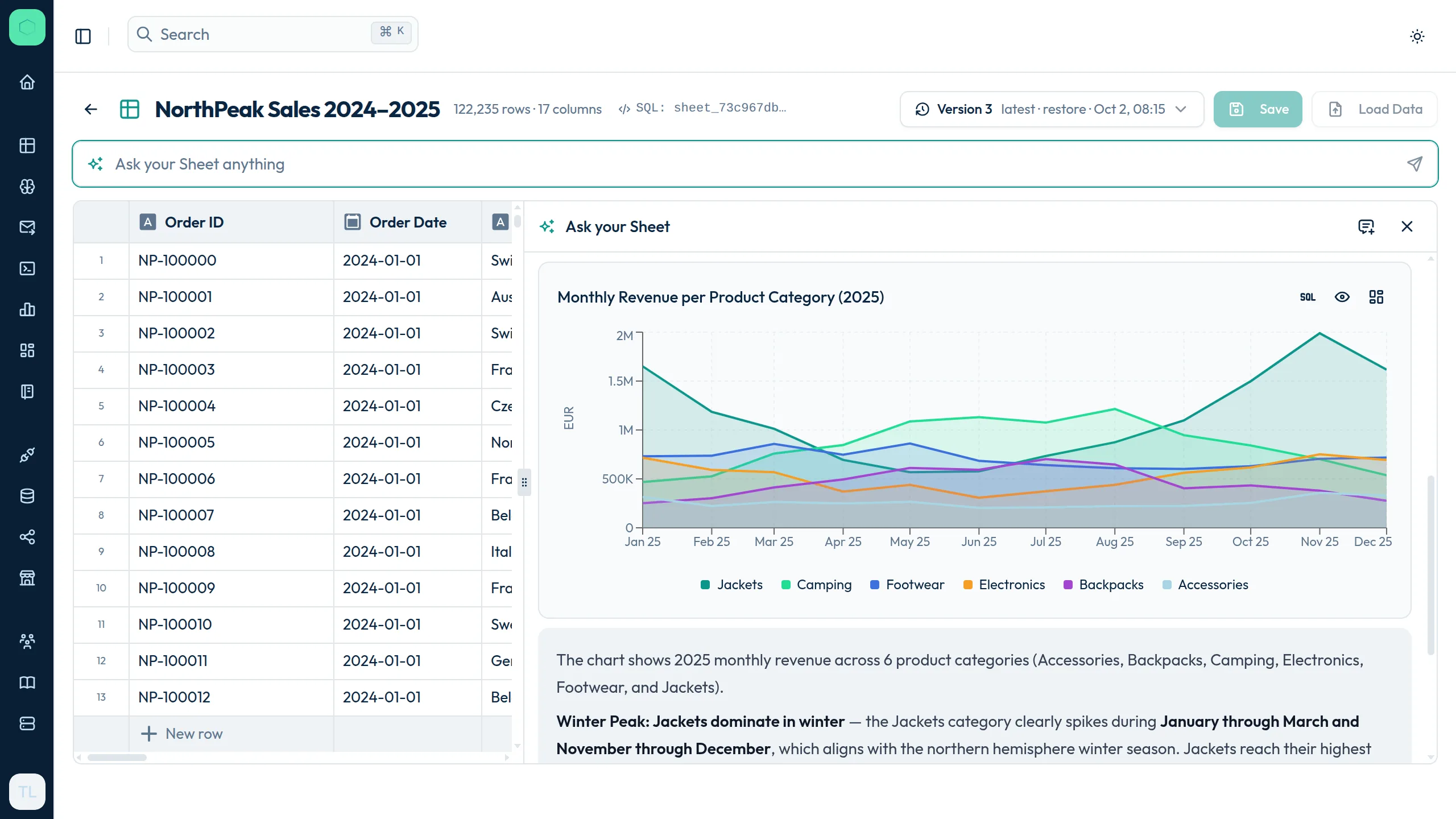
Every sheet is also a SQL table. Copy its name from the sheet header (SQL: sheet_…) and open Insights → SQL Workbench:
SELECT `Region`, toYear(`Order Date`) AS year, round(sum(`Revenue EUR`)) AS revenueFROM sheet_your_sheet_idGROUP BY `Region`, yearORDER BY `Region`, yearMore in the Sheets guide. Ready for live data? Continue below.
3. Create an API key
Section titled “3. Create an API key”In the admin UI, open Data In → API Keys → Create key. You’ll get a client ID and a secret starting with ilk_. Copy the secret now — it’s shown exactly once. The same key authenticates every ingestion and query path.
Export them so the rest of this tutorial picks them up:
export ICELAKE_CLIENT_ID="your-client-id"export ICELAKE_API_KEY="ilk_..."4. Send your first live signal
Section titled “4. Send your first live signal”Any Prometheus agent, OpenTelemetry Collector, Fluent Bit, or curl can talk to Icelake. The shortest possible smoke test is one curl that pushes a log line into the Loki-compatible endpoint:
curl -X POST https://api.icelake.eu/loki/api/v1/push \-u "$ICELAKE_CLIENT_ID:$ICELAKE_API_KEY" \-H "Content-Type: application/json" \--data-binary @- <<EOF{"streams":[{"stream":{"app":"quickstart"},"values":[["$(($(date +%s) * 1000000000))","Hello from Icelake Quickstart"]]}]}EOFA 204 No Content means it landed. For real data flows, point your existing tools at the managed endpoints:
| Source | Endpoint | Doc |
|---|---|---|
| Prometheus remote write | https://api.icelake.eu/api/v1/prom/push | Prometheus |
| Loki push API | https://api.icelake.eu/loki/api/v1/push | Loki & LogQL |
| OpenTelemetry OTLP HTTP | https://api.icelake.eu/otlp/v1/{logs,metrics} | OpenTelemetry |
| MQTT (TTN or your broker) | configured via the admin UI | MQTT |
All of them authenticate with the same client ID + ilk_… secret, either as HTTP Basic auth or as the pgwire username/password pair.
5. Launch Grafana pointed at Icelake
Section titled “5. Launch Grafana pointed at Icelake”Already have a Grafana (cloud or internal)? Skip to the datasource config below. Otherwise, this docker-compose.yml plus a provisioning file brings up a local Grafana with Icelake pre-configured as both a Prometheus and a Loki datasource:
services:grafana: image: grafana/grafana:latest ports: - "3001:3000" environment: - ICELAKE_CLIENT_ID=${ICELAKE_CLIENT_ID} - ICELAKE_API_KEY=${ICELAKE_API_KEY} volumes: - ./grafana/provisioning:/etc/grafana/provisioningapiVersion: 1
datasources:- name: Icelake Metrics type: prometheus access: proxy url: https://api.icelake.eu/prom basicAuth: true basicAuthUser: ${ICELAKE_CLIENT_ID} secureJsonData: basicAuthPassword: ${ICELAKE_API_KEY} isDefault: true
- name: Icelake Logs type: loki access: proxy url: https://api.icelake.eu/loki basicAuth: true basicAuthUser: ${ICELAKE_CLIENT_ID} secureJsonData: basicAuthPassword: ${ICELAKE_API_KEY}Run docker compose up -d. Grafana picks up the datasources on startup — no click-through config needed.
6. Explore in Grafana Metrics Drilldown
Section titled “6. Explore in Grafana Metrics Drilldown”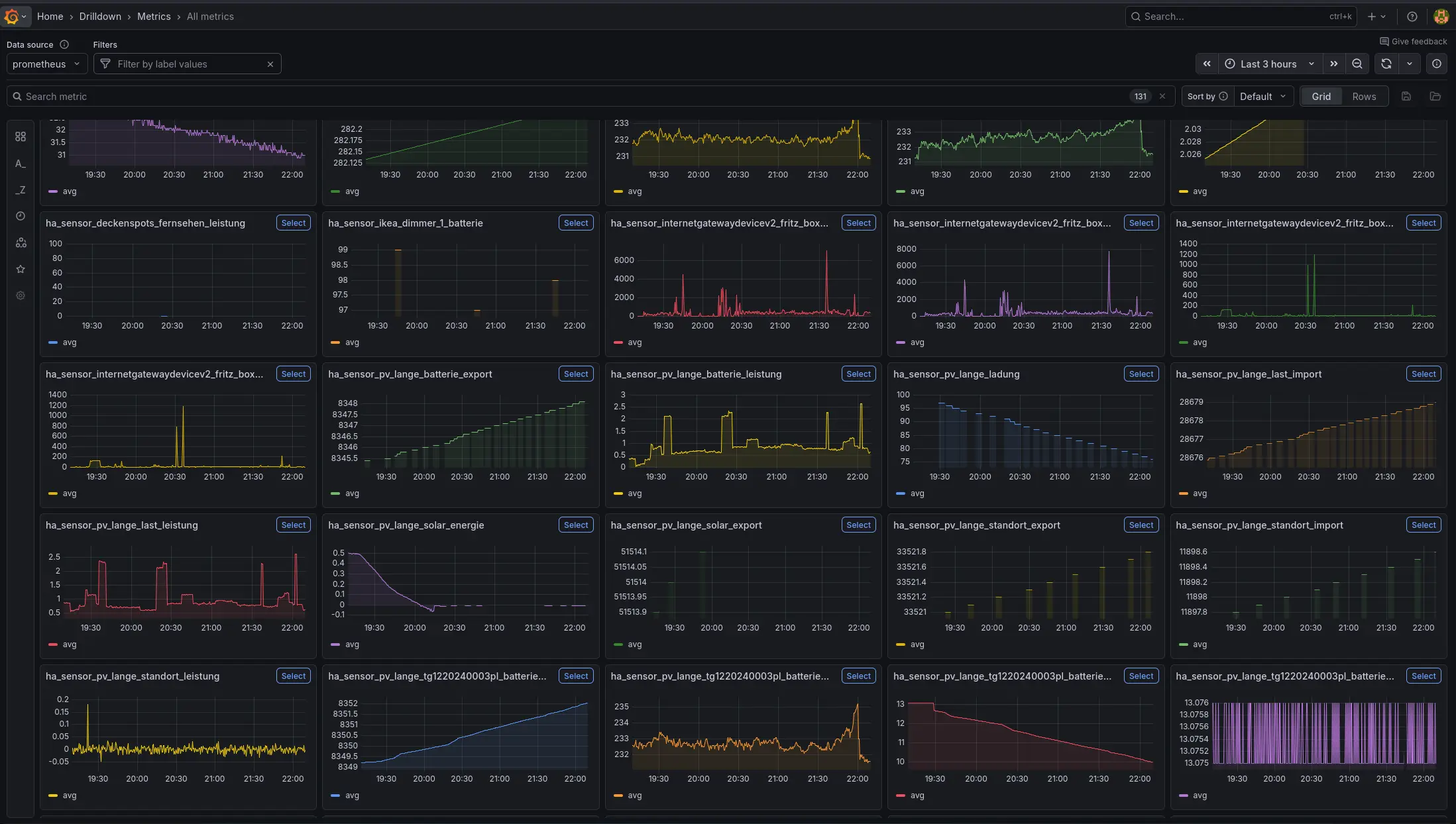
Open http://localhost:3001, sign in (default admin / admin), and head to Explore → Metrics. Grafana reads labels and series directly from Icelake’s Prometheus-compatible /prom/api/v1/* endpoints, so Metrics Drilldown, ad-hoc PromQL, and saved dashboards all work out of the box. Switch the datasource to Icelake Logs for LogQL against your ingested logs.
Next steps
Section titled “Next steps”- Sheets — load your own CSVs, edit them with full version history, ask them questions
- Prometheus — remote write configuration and tuning
- Loki & LogQL — log shipping and query examples
- OpenTelemetry — OTLP over HTTP for logs and metrics
- Query Interfaces — pgwire SQL, REST, and more
- Jupyter Notebooks — VS Code + JupySQL + matplotlib against Icelake
- Admin Dashboard — the built-in UI for dashboards and AI MasterMind